


Spanish Recipes
3.969.00 Reviews
App Specs
- Version
- 11.16.592
- Updated On
- License
- Free
- Downloads
- 100,000+
- Developer
- Riafy Technologies
- Categories
- Food & Drink
- Platform
- Android
Screenshots
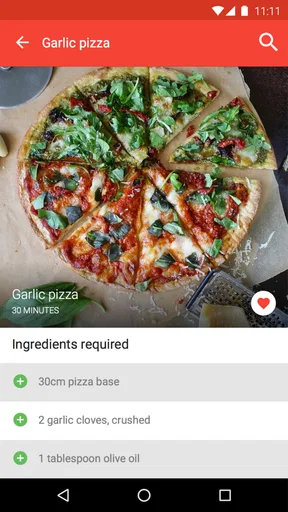
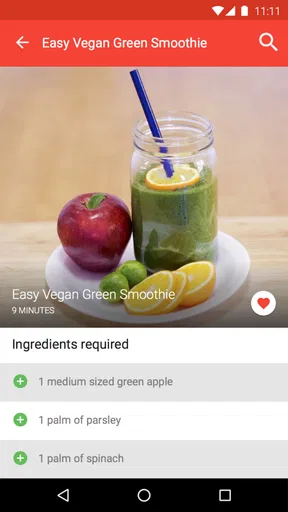

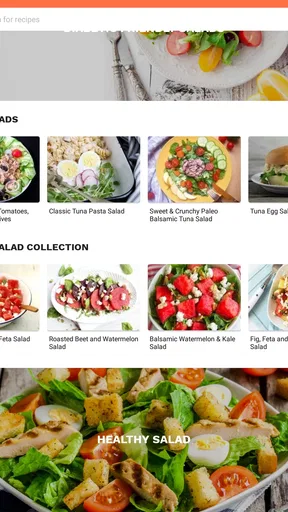
 Analysis by AppCompare
When I consider trusting a cooking app, I start with a practical question: what does it ask me to do, and what choices can I actually see before using it? Spanish Recipes is a food and drink app from Riafy Technologies, aimed at people who want Spanish-inspired ideas in the kitchen. Its appeal is easy to understand, but I’d judge it by the usefulness of its recipes and by how comfortable I feel with its visible controls, rather than assuming anything about its data practices.
Start with the choices you can inspect
Before settling into any recipe app, I like to look at its available settings and prompts, especially if it offers sharing or other connected features. I would treat each request as a separate decision: a recipe does not automatically need the same access as a feature that interacts with another service. If a prompt appears, I check what it is for and whether I can continue without accepting it. That is a sensible habit here, particularly for anyone who only wants to browse recipes.
I also avoid entering personal details unless a feature clearly needs them and I’m happy with the reason. The safest way to approach Spanish Recipes is to use the parts that are useful to you and make deliberate choices when the app presents an option. That keeps the experience focused on cooking instead of treating every available feature as something you have to use.
Cooking decisions are personal, too
Food choices can involve allergies, religious restrictions, health needs, or simply a strong dislike of a particular ingredient. I wouldn’t treat a recipe suggestion or a portion adjustment as a substitute for checking the ingredient list yourself. Before shopping or cooking, I read every ingredient and decide whether it works for the people who will eat the meal. That small check matters more than a polished photo or a confident-sounding recipe note.
If I’m cooking for someone else, I make the final call on substitutions rather than assuming a dish can be adapted without changing its result. A Spanish recipe may depend on a particular ingredient for its texture or flavor, and replacing it can affect both. The app can be a starting point; my own judgment still belongs in the kitchen.
Getting Started: A Flavorful Interface
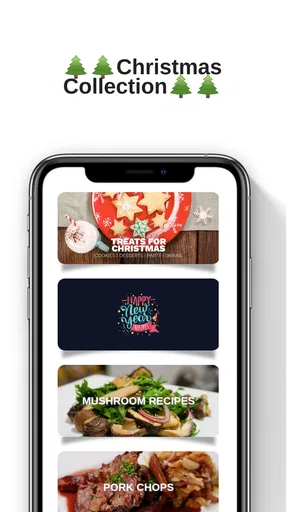
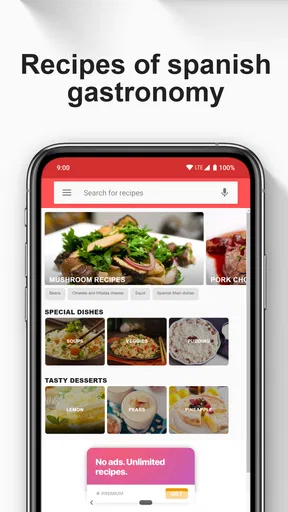
Right off the bat, the app welcomes you with vibrant colors and an intuitive layout that screams Spain. The home screen is organized into categories like "Tapas," "Main Dishes," and "Desserts," making it easy to navigate. I was particularly impressed with how Spanish Recipes uses high-quality images that almost make you smell the saffron and chorizo through the screen.
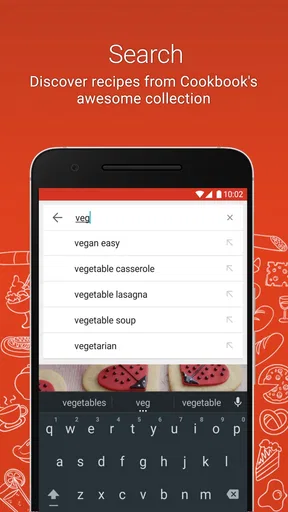
One of the first things I noticed was the handy search function. If you're craving a classic Paella or looking to try something new like a Catalan cream, just type it in, and you're good to go. The app is both visually appealing and user-friendly, which is a win-win in my book.
Worth Reading Before You Choose

EA SPORTS FC Mobile 26 Is a Bigger Football Game, but It Takes Time

Flipboard Shows What News Apps Must Do Beyond the Feed

Switching to Android Auto Means Rethinking Your Driving Routine

Google Calendar Makes a Crowded Week Easier to Manage

Ludo King Makes the Most of the Minutes Between Plans

Baby Panda World Brings Quick Play to Modern Phones, but Its Game Library Feels Busy
A Deep Dive into the Recipe Collection
The recipe collection is where this app truly shines. Each recipe is detailed with step-by-step instructions, ingredient lists, and even cooking tips. As someone who occasionally turns my kitchen into a disaster zone, I appreciated the clarity. The instructions are straightforward, ensuring even beginners can whip up a delightful Spanish feast.
What I loved most was the inclusion of cultural tidbits and historical context for each dish. It adds a layer of depth, making you feel like you're part of a rich tradition. Plus, there's a feature that suggests wine pairings, which is perfect for those of us who love a good Rioja with our meal.
Choose recipes with a plan, not just a craving
For a weeknight meal, I’d use search to narrow down the dish first, then scan the ingredients before committing. That order helps avoid the common trap of choosing a tempting photo and only later discovering that the recipe calls for something I don’t have. If the recipe includes a cooking tip, I’d read it before starting rather than halfway through, when the pan is already hot and there’s little room to improvise.
The cultural notes are most useful when they add context to a meal you’re already planning. They can make a familiar dinner feel like a small food lesson, but they don’t replace practical checks such as how much time you have or whether you can source the ingredients. I’d use the app for inspiration and guidance, then make the final choice based on my kitchen, budget, and appetite.
Where it fits beside other recipe options
Compared with a general recipe search, a Spanish-focused app can make browsing feel more purposeful: you’re not sorting through dishes from every cuisine when you want a Spanish meal. That focus is the main reason I’d open it instead of a broad cooking site. On the other hand, a general recipe source may be more useful when I need a very specific dietary filter, a wider range of cuisines, or several alternative versions of the same dish.
I’d also distinguish a recipe collection from a cooking video. Written steps are easier to scan while preparing ingredients, while video can be more helpful when a technique is unfamiliar and seeing the motion matters. Spanish Recipes suits someone who wants written direction and cuisine-specific browsing; it is less compelling for a cook who relies on visual demonstrations or needs extensive nutrition and allergy tools.
Small kitchen habits that make the app more useful
One useful approach is to read a recipe all the way through before you begin, then group ingredients by when they are used. That simple preparation reduces mid-cooking pauses and helps reveal whether the dish depends on equipment or timing you may not have considered. I’d also check quantities against the number of people eating before shopping, rather than assuming that a recipe’s default amount will suit the table.
For a first attempt at an unfamiliar dish, I’d resist changing several ingredients at once. If the result is too salty, too rich, or not quite the texture I wanted, keeping most of the recipe intact makes it easier to identify what to adjust next time. That is especially useful with regional cooking, where a few core ingredients can carry much of a dish’s character.
Cooking with Convenience
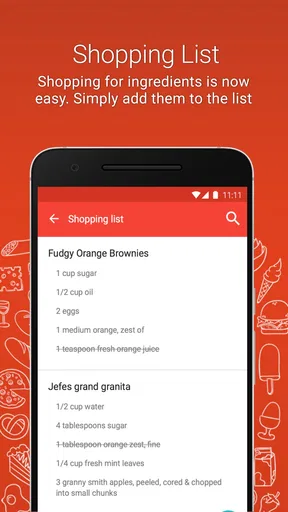
Another feature that deserves a shoutout is the shopping list function. You can select the recipes you want to try, and the app will compile a list of ingredients. It's a lifesaver for those hectic grocery runs. I also appreciated how the app syncs with grocery delivery services, saving even more time.
For those who like to tweak recipes or are dealing with dietary restrictions, the app allows you to customize ingredient portions. It’s thoughtful features like these that make Spanish Recipes stand out.
When convenience needs a second look
A generated shopping list is a useful starting point, not a guarantee that every item is ready to buy without checking. I’d review it for duplicate ingredients across selected recipes, pantry staples I already have, and quantities that may need adjustment for my plans. This takes a minute, but it can prevent an unnecessary purchase or a missing item discovered at the stove.
Portion changes help with planning, yet scaling a recipe is not always as simple as multiplying every number. Cooking time, pan size, and seasoning may not change in a perfectly linear way. When I’m making a larger batch, I’d use the adjusted quantities as a guide and taste carefully as I go. That is a more dependable approach than expecting a scaled recipe to behave exactly like the original.
Delivery connections can be convenient for people who already order groceries that way, but they are not essential to the app’s core purpose. If I prefer shopping in person or want to compare products myself, I can still use a list as a checklist. I would only follow a connection flow if I wanted that service and felt comfortable with the choices shown during setup.
A realistic way to use it on a busy evening
Imagine getting home with limited time and wanting something more interesting than the usual quick dinner. I’d search for a Spanish dish, open a promising recipe, and check the ingredient list before deciding. If it calls for something I don’t have, I can either choose another recipe or make a considered substitution instead of discovering the problem halfway through. Once I’ve chosen, I’d add the needed items to the list, remove anything already in the cupboard, and shop with a clearer plan.
That workflow is where the app makes the most practical sense: not as a complete meal-planning system that decides what the household should eat, but as a focused way to move from an idea to a recipe and then to a shopping trip. It can help a beginner feel less lost, while an experienced cook may mainly value the cuisine-specific inspiration and concise directions.
Who will enjoy it, and who may want another tool
I’d recommend trying it if you’re curious about Spanish cooking, want a dedicated place to browse dishes, or need clear written steps to build confidence. It may also suit someone who enjoys learning a little context alongside a recipe, rather than treating cooking as a list of instructions alone. The free price makes it approachable to explore, although in-app purchases range from about 49 cents to just under 60 dollars per item, so I’d pay attention to any purchase prompt and decide based on what it offers me.
I’d look elsewhere if my priority were detailed nutrition tracking, robust allergen management, advanced meal scheduling, or a large community whose activity I could assess before joining. Those needs call for tools designed around them. Spanish Recipes is better approached as a cuisine-specific recipe companion, not as a substitute for specialist dietary advice or a comprehensive kitchen organizer.
Community and Sharing
A delightful surprise was the community aspect of the app. You can connect with other users, share your culinary creations, and even exchange tips. It’s like having a virtual Spanish cooking club. The app also allows you to share recipes on social media, which is perfect for showing off your latest kitchen masterpiece.
There's something incredibly satisfying about sharing a dish you’ve mastered, and this app makes it easy to do just that. Whether you're a seasoned chef or a newbie, the community feature adds a layer of fun and camaraderie.
Keep sharing on your own terms
Sharing is optional, and I’d treat it as a separate part of the experience rather than something required to get value from the recipes. If I want to post a finished dish, I can choose what I’m comfortable showing and where I want it to appear. I’d be more cautious about sharing personal details or kitchen photos that reveal information I would rather keep private. The practical rule is simple: enjoy the social side if it adds something, but keep the app useful even when you decide not to participate.
The overall reception is mixed but respectable: Spanish Recipes has a 3.9 average from around 640 ratings, with more than 100,000 installs. It is free to download, is rated for everyone, and its current version is 11.16.592; it runs on operating systems starting at version 7.0. Those figures give a quick sense of its reach, but they cannot tell me whether a particular recipe suits my taste or whether a feature fits my habits. I’d treat them as context, then judge the app by trying the browsing and cooking flow for myself.
Final Thoughts: A Must-Have for Food Lovers
In conclusion, if you're passionate about cooking and eager to explore Spanish cuisine, Spanish Recipes is a must-download. It brings the vibrant flavors of Spain right to your kitchen, making it a delightful resource for anyone looking to expand their culinary repertoire.
With its user-friendly interface, rich recipe collection, and community features, this app is more than just a cooking guide—it's a celebration of Spanish culture and cuisine. So, grab your apron, fire up the app, and let the culinary exploration begin. ¡Buen provecho!
My cautious verdict
I see Spanish Recipes as a useful, focused companion for choosing and preparing Spanish dishes, especially when clear instructions and a shopping list can make an unfamiliar meal feel manageable. Its strengths are the way it brings browsing, recipe guidance, and cooking inspiration together; its limits are just as important: it should not be mistaken for a specialist dietary tool, a full meal planner, or a reason to accept every optional connection or sharing choice.
If that focused role matches what you want, I’d give it a try and keep my decisions deliberate around purchases, permissions, and sharing prompts. If you need more control over nutrition, allergies, or planning across many cuisines, a broader or specialist alternative will likely serve you better. For curious home cooks who want a Spanish-themed nudge toward something different for dinner, it is an inviting place to start.
Pros
- Wide variety of authentic Spanish dishes.
- User-friendly interface with easy navigation.
- Step-by-step guides and cooking tips.
- Includes nutritional information for recipes.
- Offline access to saved recipes.
Cons
- Limited vegetarian and vegan options.
- Some recipes lack detailed ingredient info.
- Frequent pop-up ads disrupt experience.
- No option for ingredient portion adjustment.
- Requires registration for full features.
FAQs for Spanish Recipes
What features does the Spanish Recipes app offer?
The Spanish Recipes app provides a wide range of features including step-by-step cooking instructions, ingredient lists, cooking tips, and video tutorials. It also offers meal planning tools and a grocery list generator. Users can filter recipes by dietary preferences, difficulty level, or cooking time, ensuring a customized cooking experience.
Is the Spanish Recipes app suitable for beginners?
Absolutely! The app is designed to cater to all skill levels, including beginners. It offers easy-to-follow recipes with clear instructions and visual aids. Each recipe includes detailed information on preparation and cooking times, making it accessible for those new to cooking Spanish cuisine.
Does the app require an internet connection to access recipes?
While an internet connection is necessary for initial download and updates, the Spanish Recipes app allows users to save their favorite recipes for offline access. This feature is particularly useful for those cooking in areas with limited connectivity, ensuring you can always access your go-to dishes.
Are there any in-app purchases or subscriptions required?
The Spanish Recipes app is free to download and offers a variety of recipes at no cost. However, it does include optional in-app purchases for additional features such as premium recipe collections or ad-free browsing. Users can enjoy the basic functionalities without any subscription.
How often is the content updated with new recipes?
The app is regularly updated with new recipes and features. The development team aims to introduce fresh content monthly, ensuring a diverse and exciting collection of Spanish dishes. Users will receive notifications about updates, allowing them to explore new culinary options regularly.


